
What CoreX does
Modules for the daily work of a technical department, from asset records to reports that send themselves.
Machinery catalogue
The home page shows the current state at a glance: total assets, active assets, average working hours and a ranking of the busiest machines. Assets are grouped into vertical and horizontal machinery and vehicles, and service warnings are visible on every category.
- Total and active assets, average hours per machine
- Top 5 machines by working hours for the current period
- Quick search by name, serial number, VIN, part or service
Working hours
Hours are entered in one place or straight from the asset card. The usage chart shows how hours accumulate over time, so it is obvious which machine is working more than usual.
- Enter working hours for one or several assets
- Usage chart on the asset card
- Monthly working-hours overview with Excel export
Services and parts
Each assembly has its own service interval: engine, gearbox, differential, hydraulics. CoreX calculates the hours remaining and keeps a list of consumables with quantities and codes for every service.
- Remaining hours per assembly and service status
- Oil, filters, grease and coolant listed for each service
- Manuals and instructions attached to the asset
- History of working hours and services
Faults and condition
A fault is reported on the asset and stays active until it is resolved. The “Needs attention” page collects everything that requires action, and analytics show where faults keep recurring.
OverdueDue soonOK
- Active faults and faulty assets in one place
- Assets ranked by number of faults
- Average time to resolve (MTTR) for a period
- List of assets with missing data
Fault analytics
Pick a period and get an overview: total faults, how many are currently active and how long they took to resolve on average. Assets with an active fault are highlighted in the list.
- Filter by period
- Fault count, active faults and average MTTR
- Ranking by asset and type
Reports
Reports are generated with one click, with no copying into spreadsheets. They are also available per asset: the last 6, 12 or 24 months, since the asset arrived, or just the technical specifications.
- Asset register in Excel
- Daily PDF report: status and hours of all equipment
- Service report and fault report for a chosen period
- Monthly working hours with an overview and Excel export
Vehicles
Vehicles are managed in the same system, but with mileage instead of working hours. Services are calculated by kilometres driven (minor service, major service, brakes), and an expired registration is visible on the card straight away.
- Mileage entry and chart
- Service intervals in kilometres
- Warning when registration expires
Energy and water
The electricity and water consumption modules keep measurements in the same place as the rest of the records, so the technical department does not need separate spreadsheets.
- Electricity consumption
- Water consumption
- Same look and search as the rest of the platform
Infrastructure
The infrastructure diagram shows the hierarchy of physical facilities, for example a warehouse and substations with their sub-facilities, plus additional logical links between systems. A register and an overview are available as separate views.
- Facility hierarchy with type and location
- Logical links between systems
- Facility register and overview
Multilingual interface
The application is available in five languages, and each user picks theirs from the top menu. Translations live in a single file, so adding a new language does not require changes to the application itself.
- Montenegrin (Serbian)
- English
- Turkish
- German
- Bulgarian
- Any other language on request
Notifications
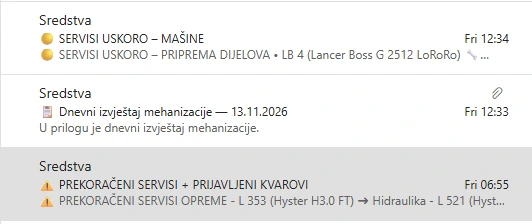
CoreX sends emails when something needs attention: a service is coming up, an interval has been exceeded or a fault has been reported. The daily machinery report arrives as a PDF attachment.
- Services due soon
- Overdue services and reported faults
- Daily machinery report attached
Everyday use
- Search by name, serial number, VIN, part and service
- Light and dark theme
- Interface in 5 languages, with room for more
- User account and administration